DNS Record Types Explained

How does a browser know where a website lives?
when you type google.com in your browser, computer doesn’t understand what is it.
It only understand numbers(IP address).
Analogy : When you type “father” in Phonebook. It translate father to “8789******” .
Phonebook do for your phone.
DNS do the same for your browser. It translates domain name(google.com) to IP address(142.251.43.110).
Why DNS records are needed?
It is a collection of small records, and each records solves one problem.
DNS A record:
The A stand for “address”. It is most fundamnetal type of DNS records.
A records maps domain name to IPv4 address.It tell website where is website server is.
google.com ----> 142.251.43.110
Example:
| google.com | Record type: | Value: | TTL |
| @ | A | 142.251.43.110 | 1440 |
DNS AAAA record:
A records maps domain name to IPv6 address. DNS AAAA record are exactly same, except they store IPv6 address instead of IPv4.
Example:
| google.com | Record type: | Value | TTL |
| @ | AAAA | 2a00:1450:400e:803::200e | 1440 |
DNS CNAME record:
CNAME stands for Canonical Name.
A CNAME does not point to an IP ,It points to another domain name.
Analogy:
Nickname - Punk
Real Name - Pankaj Kumar
Example:
www.example.com → example.com
Points to remember :
A records:
Name (Host) ——> IP address
example.com ——> 192.0.2.1CNAME records:
Alias Name ——> Real Name
www.example.com ——> example.com
DNS NS record:
The NS(Name Server) records indicates which DNS server is authoritative for that domain (i.e. which server contains the actual DNS records). Basically, NS records tell the Internet where to go to find out a domain's IP address.
Example:
| example.com | Record type: | Value: | TTL |
| @ | NS | ns1.exampleserver.com | 21600 |
DNS MX record:
MX( Mail Exchange) records directs email to a mail server responsible for receiving emails for a specific domain.
The components of a DNS MX record are – Domain name, record type, priority, mail server, and time-to-live (TTL). DNS MX records route emails properly to ensure they reach the intended mail server.
Example:
| example.com | Record type: | Priority: | Value: | TTL |
| @ | MX | 10 | mailhost1.example.com | 45000 |
| @ | MX | 20 | mailhost2.example.com | 45000 |
Points to remember:
NS records: Tells which servers hold all your DNS records.
MX records: Route your incoming email to the correct mail server.
DNS TXT record:
TXT records, store text information related to domain and sub domain. The most important uses for DNS TXT records are email spam prevention and domain ownership verification. One domain can have many TXT records.
Example:
| example.com | Record type: | Value: | TTL |
| @ | TXT | "This is an awesome domain! Definitely not spammy." | 32600 |
How all DNS records work together for one website:
- Complete setup of DNS
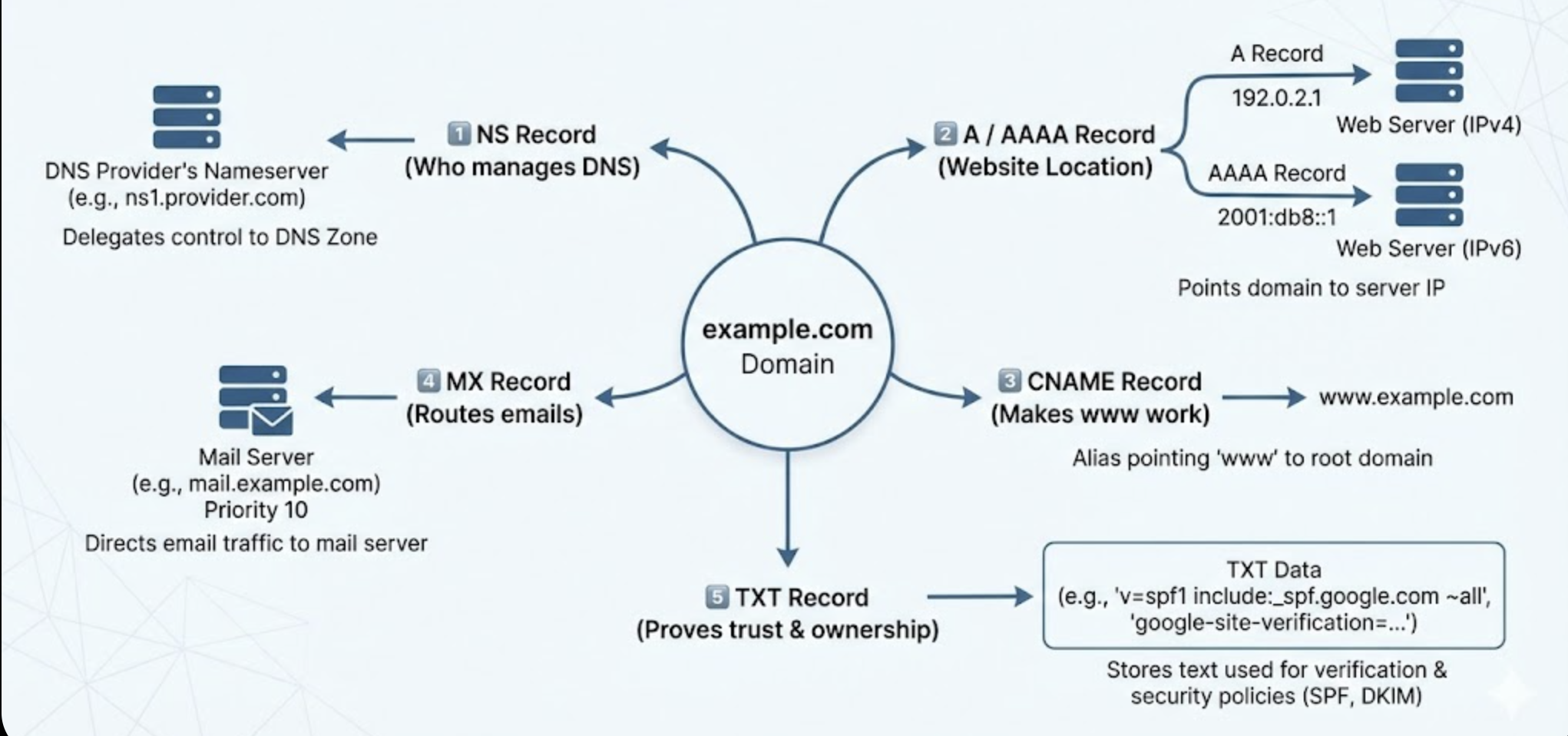
NS : Tells which servers hold all your DNS records.
A / AAAA : Points your website IP address.
CNAME : Points alias host to real host.
MX : Route your incoming email to the correct mail server.
TXT : Email protection and owner verification.