JavaScript Arrays 101
When writing programs, we often need to store multiple values together.
For example:
A list of fruits
A list of marks
A list of tasks
A list of movies
Instead of creating many separate variables, JavaScript gives us arrays.
1. What Are Arrays?
An array is a collection of values stored in order.
Think of an array like a list.
Real-Life Example
Imagine a list of fruits:
Apple
Banana
Mango
Orange
Instead of writing separate variables:
let fruit1 = "Apple";
let fruit2 = "Banana";
let fruit3 = "Mango";
We can store them in one array.
let fruits = ["Apple", "Banana", "Mango"];
Now all values are stored together in one variable called fruits.
2. How to Create an Array
Arrays are created using square brackets [].
Example
let fruits = ["Apple", "Banana", "Mango"];
Another example:
let numbers = [10, 20, 30, 40];
You can store different types of values too:
let mixed = ["Pankaj", 25, true];
But usually arrays store similar types of data.
3. Accessing Elements Using Index
Each item in an array has a position number called an index.
Important rule:
Array index starts from 0
Example Array
let fruits = ["Apple", "Banana", "Mango"];
Index Visualization
Index:   0        1        2

Array:  Apple   Banana   Mango
To access elements:
console.log(fruits[0]);
Output
Apple
Another example:
console.log(fruits[1]);
Output
Banana
4. Updating Elements
We can change values inside an array using the index.
Example
let fruits = ["Apple", "Banana", "Mango"];

fruits[1] = "Orange";

console.log(fruits);
Output
["Apple", "Orange", "Mango"]
Here we changed Banana → Orange.
5. Array Length Property
The length property tells us how many elements are in the array.
Example
let fruits = ["Apple", "Banana", "Mango"];

console.log(fruits.length);
Output
3
This is very useful when working with loops.
6. Looping Through an Array
Often we want to process every element in the array.
We can do this using a loop.
Example
let fruits = ["Apple", "Banana", "Mango"];

for (let i = 0; i < fruits.length; i++) {
  console.log(fruits[i]);
}
Output
Apple
Banana
Mango
Explanation:
istarts from 0Loop runs until
fruits.lengthEach iteration prints one element
Visual Representation of Array
Index:    0        1        2        3

Array:   Apple   Banana   Mango   Orange
Accessing elements:
fruits[0] → Apple
fruits[1] → Banana
fruits[2] → Mango
fruits[3] → Orange
Memory Style Diagram
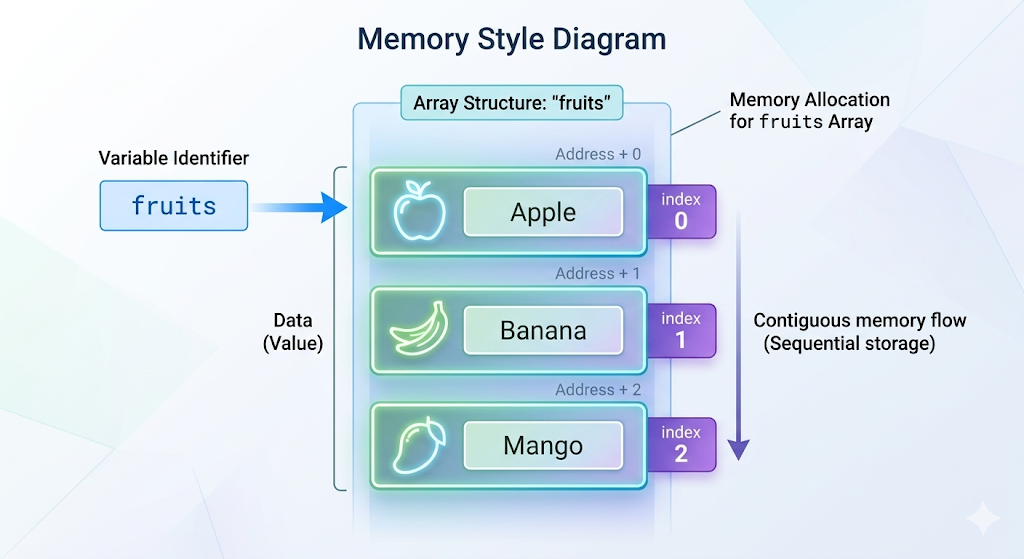
Each block stores one value in order.
Arrays are used everywhere in JavaScript, such as:
storing user data
product lists
scores
API responses